AI Voiceover for Real Estate Videos Made From Listing Photos
What is an AI voiceover for a real estate video and how does PhotoAIVideo do it?
An AI voiceover for a real estate video is spoken narration generated from text instead of recorded. In PhotoAIVideo you paste your listing description or your own script, or let the AI draft one, pick a voice, and the narration is synced over the camera-motion video made from your listing photos. It's a Pro plan feature.
Updated · By Zach Calhoon, Founder
Photos and a script in, a narrated listing video out
The two stills on the left come from the shoot of a hillside home above a river valley. The 31-second, 16:9 video on the right was generated from that shoot with an AI voice reading over the camera moves; a presenter appears in a small circle at the lower left, and a “Your new listing” title runs along the bottom. Press play with sound on to hear the narration.
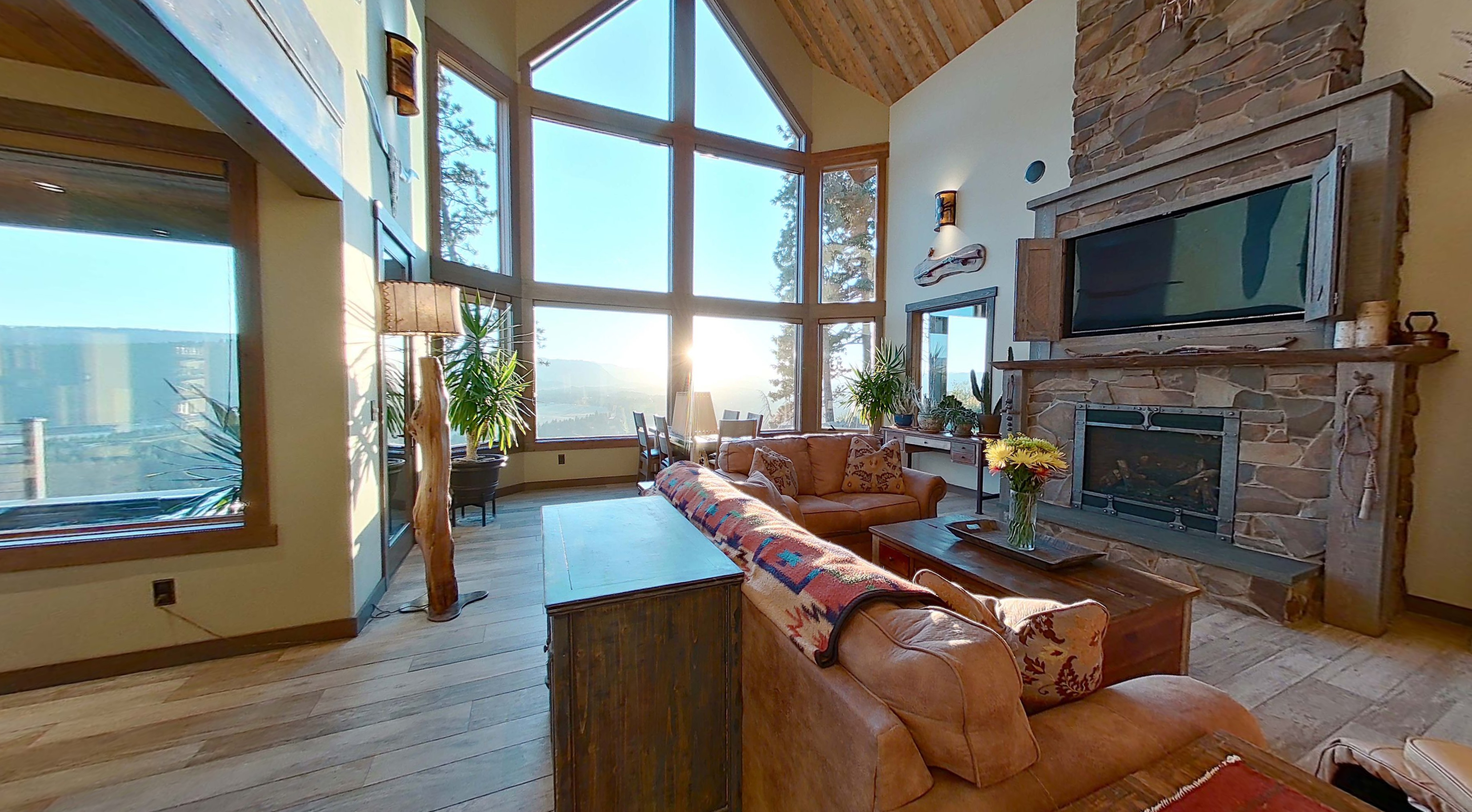
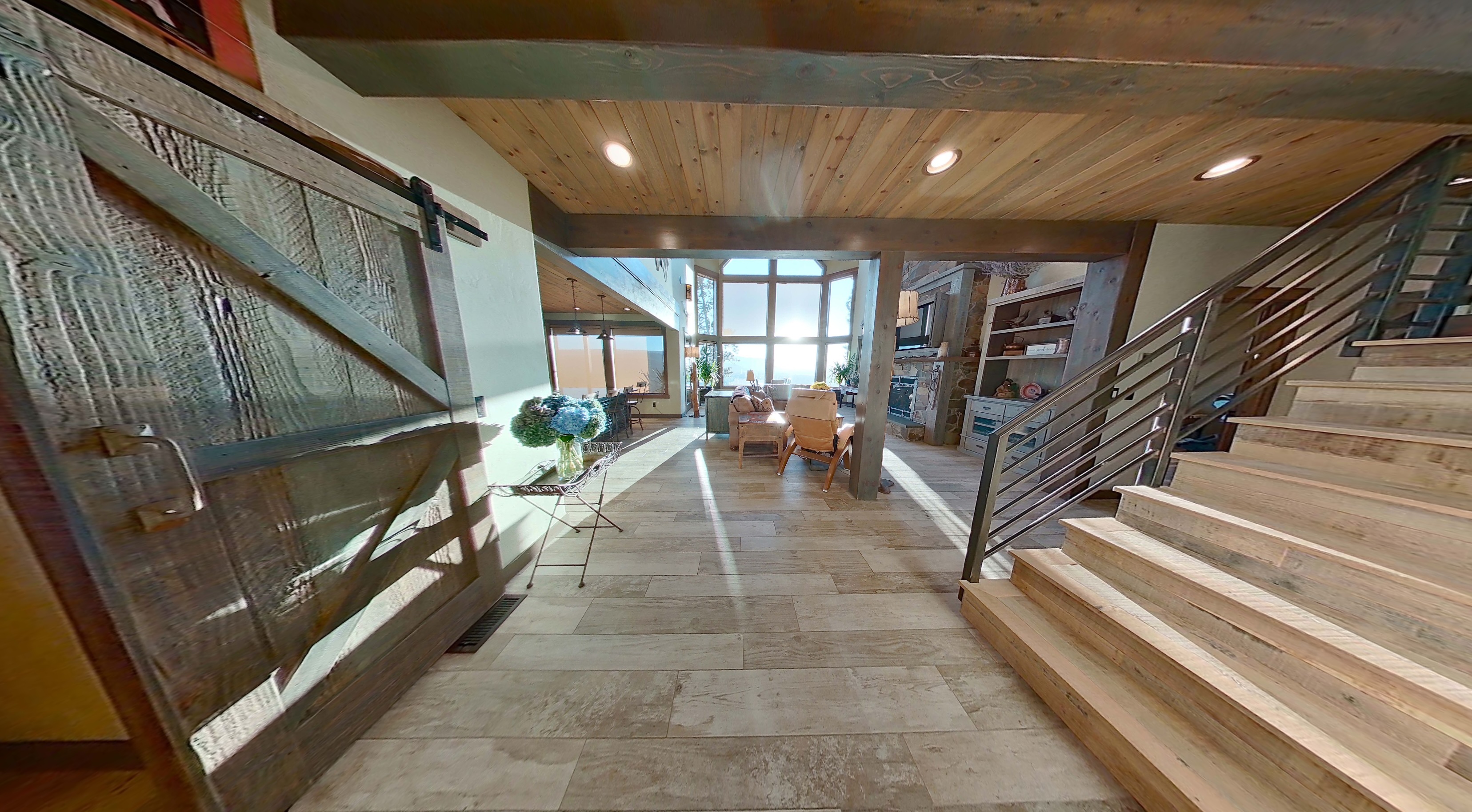
Perched on a forested ridge above the river valley, this home is built around the view. Step through the timber-beamed entry and the great room opens up: a vaulted cedar ceiling, a wall of glass facing the hills, and a stacked-stone fireplace for cold evenings. Outside, gardens and a wide drive wrap the hilltop. Book your private showing today.
Written for this page to match what the video shows. It is not a transcript of the demo's narration.
Inputs: listing photos plus the words to be spoken
AI voiceover at a glance
| Script source | Paste your listing description or your own script, or let the AI draft one from the property details |
|---|---|
| Voices | Male and female AI voices across ages, accents and speaking styles, each previewable with your script |
| Your own voice | Record your own narration instead of using an AI voice |
| Languages | English plus other languages, including Spanish, French and German |
| Captions | On-screen captions in the narration's language for sound-off viewers |
| Music under narration | Licensed background track with levels balanced so the voice stays clear |
| Output formats | 16:9, 9:16 and 1:1 from the same project |
| MLS / unbranded | Keep narration property-only, or switch it off for the unbranded export |
| Price from | Pro plan, $66.58/month billed annually ($79.92/month monthly) |
How do I add an AI voiceover to a real estate video?
Upload, give the narration its words, choose how it should sound, and export. Each step can be revisited without redoing the others.
Upload the listing photos
Drop in the shoot as JPG, PNG, HEIC or WebP. The AI gives each still its own camera move and assembles the clips in order.
Add or generate the script
Paste the MLS description, type your own lines, or let the AI draft narration from the property details. Every word stays editable.
Pick a voice and language
Preview voices before committing, set the tone from warm to authoritative, choose the language, and decide whether music plays underneath.
Render and download
Preview the narrated cut, adjust anything that sounds off, then export 16:9, 9:16 or 1:1. Most renders finish in two to five minutes.
How does AI narration for listing videos work, and where does the script come from?
There are three ways to give the narration its words. The quickest is pasting the description you already wrote for the MLS, which turns a listing description into video narration with almost no extra effort. The second is typing a script of your own, useful when you want to stress something the write-up glosses over. The third is asking the AI to draft lines from the property details and then editing its draft.
Whichever source you use, the engine converts that text to speech and lays the audio over the camera moves it built from your photos, so you never line up a waveform by hand. A description written to be read silently rarely sounds right aloud, though. Spell out abbreviations such as “BR” and “sq ft,” cut parentheses, and break long sentences in two before you generate.
If you would rather focus on the wording first, the real estate video script generator is built for that single job.
Text-to-speech vs a human voiceover artist: what's the real difference for a listing video?
A skilled human narrator still brings things software struggles with: an improvised aside, a laugh that lands, a read shaped by walking the property themselves. For a flagship estate film or a brand anthem, that craft can be worth booking.
Most listing videos ask for something plainer: clear, warm delivery of accurate facts, produced quickly and changed easily. That is where text to speech for real estate video earns its place. You hear the result before you pay anyone, a price reduction becomes a one-line text edit, and every home in your inventory can carry the same recognisable voice. Pick by the job, not by habit. If a listing will be live for a week, waiting days for a studio read makes little sense.
Can I clone my own voice so the narration sounds like me?
What the product supports today is recording your own voice as an alternative to the AI voices; the AI Avatar add-on on the pricing page lists that option directly. Our pages do not describe a feature that synthesises new narration in a cloned version of your voice, so if a realtor voice clone is the goal, plan on recording your lines rather than expecting the AI to imitate you.
Agents who want their face on screen as well as their voice can look at the AI avatar for real estate agents hub, and the piece on pairing voice with AI avatars shows how the two fit together.
Can one listing video be narrated in Spanish or other languages?
Yes. Narration is available in English and a range of other languages, Spanish, French and German among them, so a multilingual listing video means choosing another language for the same project rather than hiring a translator and a second narrator. Have a fluent speaker read the translated script once before it goes out; property terms do not always translate word for word.
For Spanish-speaking buyers specifically, the Spanish listing video generator covers bilingual versions and on-screen captions in the same language.
Writing a voiceover script that sells the home
- Budget one or two short sentences per photo. Spoken delivery runs slower than reading, so a script that looks thin on screen usually fills the video nicely.
- Open with the strongest feature. The view, the renovated kitchen, the lot size: whatever made you take the listing belongs in the first line, not the last.
- Give the location one line. A sentence on the street, the trail nearby or the commute places the home without turning the video into a tourism ad.
- Close with a clear next step. “Book a private showing” works on your own channels; keep contact details out of the cut meant for the MLS.
- Describe the property, not the buyer. Fair-housing safe wording talks about rooms, features and distances. Avoid phrases like “perfect for a young family” or “ideal for retirees” that point at who should live there.
Want a first draft to react to? The script generator gets you past the blank page.
Voiceover, music, captions: what goes where?
Think about where the video will be watched. On the MLS, YouTube and your own website people tend to listen, so narration carries the story, with music sitting quietly underneath; the levels are balanced for you so the voice stays on top. In muted social feeds the opposite holds, and on-screen text has to do the talking for anyone scrolling with the sound off.
The MLS adds one more constraint: the narration must stay neutral, with no name, brokerage or phone number, or be switched off for that export. The MLS-compliant video guide explains the unbranded rules, and the real estate social media video app covers the vertical, sound-off side.
Adding voiceover automatically to every listing
Narration only becomes routine when it costs almost nothing to add. Saving one voice and one tone as your default means each new listing needs only its description pasted in. The automatic voiceovers page shows that workflow, and adding voiceovers to property videos automatically explains voice suggestions by property type. Brokerages producing at volume can look at the real estate video API.
AI voiceover vs recording it yourself vs hiring a voiceover artist
Three ways to put a voice on a listing video, compared on what each asks of you and what you get back.
| Criterion | PhotoAIVideo AI voiceover | Recording it yourself | Hiring a voiceover artist |
|---|---|---|---|
| Time per listing | Minutes: paste or generate text, choose a voice, render | Writing, a quiet room, several takes, then syncing audio to the edit | Brief, wait for delivery, review, request pickups |
| Cost | Included with Pro, from $66.58/month billed annually | Your time plus a decent microphone | A fee for every recording and every revision |
| Output | Narration synced to the video, with music balanced underneath | Raw audio you still have to mix and line up | A polished audio file you still have to cut in |
| Edits and re-use | Change a line and regenerate at no extra charge; keep one signature voice on every listing | Re-record the line and hope it matches the rest | Another booking for each price drop or correction |
| Languages | Pick another language for the same listing | Only the languages you speak fluently | A separate artist for each language |
A voiceover artist remains a fair choice for a signature brand film. For the weekly run of listings, editable AI narration keeps every video consistent and current. Details on the pricing page.
Explore AI Voiceover & Narration: tools and features
- AI voiceover generatorThe generator itself: script in, narration out, with voice previews.
- AI voice overs for real estateVoice styles matched to luxury, family and commercial listings.
- AI voiceover video makerBuilding a whole narrated video around a script and a signature voice.
- AI marketing voiceoverNarration for promos and brand videos beyond a single listing.
- Automatic voiceoversHands-off narration with templates for property descriptions.
- Add voiceovers automaticallyVoice suggestions by property type and auto-synced audio.
Explore AI Voiceover & Narration: how-to guides
Explore AI Voiceover & Narration: languages and scripts
Explore AI Voiceover & Narration: related
Frequently Asked Questions
Give your next listing a voice
Upload the photos, paste the description, and hear the narrated cut before you share it. Still building the video itself? Start with the AI listing video generator or the real estate photo to video guide.