AI Listing Video Generator for Every Stage of a Listing
What is an AI listing video generator and what does PhotoAIVideo produce?
An AI listing video generator builds a finished property video from the listing's photos and details, with no editing timeline. PhotoAIVideo writes the script from your price, beds and features, narrates it, adds music and camera motion, and renders an unbranded MLS cut plus branded 16:9, 9:16 and 1:1 versions in minutes.
Updated · By Zach Calhoon, Founder
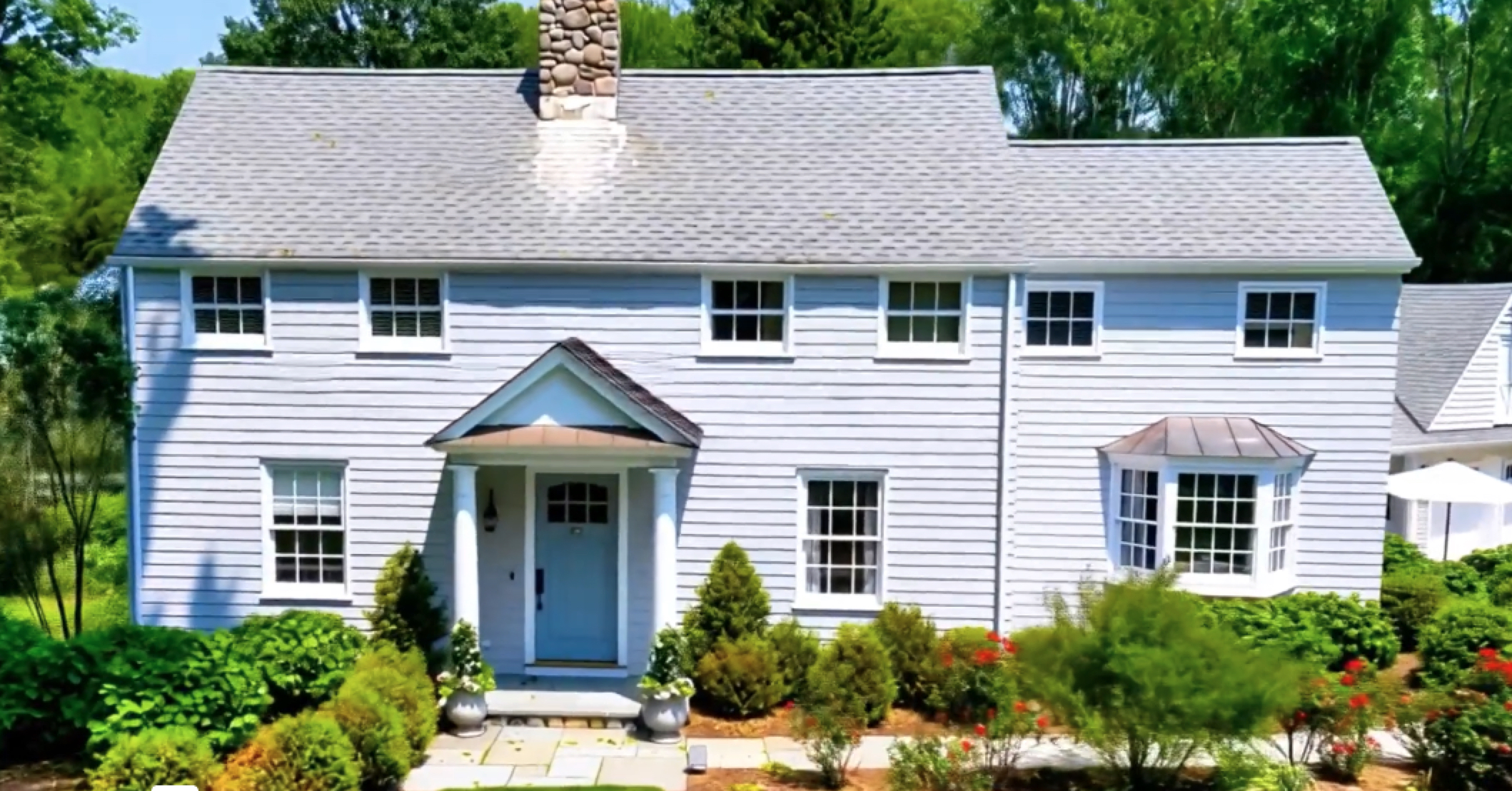
One colonial, from listing photos to listing video
This Connecticut colonial was photographed, not filmed. The generator opened on the front elevation you see on the left, eased toward the portico so the blue door becomes the focal point, then carried the tour indoors from the same photo set. The result runs just over a minute, which is the length of the full tour you would put on the MLS rather than a social teaser.
What the listing video generator gives you
| What you provide | Listing photos (JPG, PNG, HEIC or WebP) plus price, beds, baths and key features |
|---|---|
| Video types | Just listed, open house, coming soon, price reduction, just sold and luxury, all from one project |
| Exports | Unbranded MLS cut with music optional, plus branded 16:9, 9:16 and 1:1 versions |
| Narration | AI-written script from your listing details, read by an AI voice; captions on screen |
| Render time | 2 to 5 minutes for most videos; regenerate any time the price or details change |
| Price from | Free plan with 1 project and 5 generations, no watermark. Paid from $37.50/month billed annually ($49.95/month monthly). |
How do I make a listing video with AI?
Five steps from a new listing to a set of videos for the MLS and every channel you post on.
Start a project for the listing
Upload the listing photos in JPG, PNG, HEIC or WebP. The generator sorts them into a showing order, which you can drag to change.
Enter the listing details
Add the address, price, beds, baths, square footage and the three or four features you would mention first at a showing. The AI drafts the narration script from them.
Choose the video type and style
Pick just listed, open house, coming soon, price reduction or just sold, then a voice, a music track and your saved brand kit.
Generate and review
Most videos render in 2 to 5 minutes. Adjust the script, a camera move or the pacing and regenerate until it is right.
Download each version
Download the unbranded MLS cut and the branded 16:9, 9:16 and 1:1 files. They stay in your account for 30 days.
Which listing videos should I make for each property?
A listing goes through several moments that are each worth a post, and each needs a slightly different video. Every type below comes from the same project, so once the photos are in, the next one only needs a new headline and a regenerate.
Just listed video
The launch announcement. Lead with the best exterior, put price, beds and baths on screen in the first few seconds, and post it the day the listing goes live. See the just listed video guide or go straight to the just listed video maker.
Open house video
A countdown post for the week before. The date, time and address need to stay on screen long enough to read, and the tour can be shorter, since the goal is getting people through the door. The open house video maker sets up that overlay for you.
Coming soon listing video
A teaser built from one or two exteriors and a single interior highlight, posted before the home is on the MLS to collect interested buyers early. Hold back the rest of the rooms. More on coming soon videos.
Price reduction video
New price, same home, fresh attention. Regenerate the original project with the updated figure as the headline so buyers who scrolled past the first time get a reason to look again. See price reduction videos.
Just sold video
A closing turned into marketing for your next listing. It is aimed at future sellers rather than buyers, so your branding and a short line about the result matter more than a full tour. See just sold videos.
Luxury listing video
Slower camera moves, longer holds on architecture and views, and a restrained score. Captions stay minimal so the home carries the video. Read about luxury real estate video and listing videos for luxury homes.
How long should a real estate listing video be?
Shorter than most agents expect for social, and longer than most expect for the MLS. On Reels, TikTok and Shorts, 30 to 60 seconds works well: the viewer decides in the first few seconds, so open on the best shot and leave out secondary bedrooms and hallways. A coming soon teaser can be shorter still.
The MLS and portal version is different. Someone watching it on Zillow or Realtor.com has already clicked on the home and wants to see how it flows, so a full room-by-room tour belongs there. Build the long version first and trim the social cut from it, rather than the other way round.
Should my listing video have music, a voiceover or both?
Branded social cuts usually get both. The AI drafts a script from the listing details and reads it in the voice you choose; edit any line that overstates a feature or misses the one detail your buyers will ask about. Keep captions on either way, since most people watch social video with the sound off.
For the MLS, check your board's rules. Many prefer no music, and MLS mode lets you turn it off and strips branding in the same step. A calm, narration-free version is also a sensible choice for a luxury listing, where the pictures do the talking. Agents marketing to Spanish-speaking buyers can use the Spanish listing video generator.
Is this more than a Ken Burns slideshow?
Yes. A Ken Burns slideshow applies the same zoom and pan to every flat image. The generator reads depth in each photo, separates foreground from background and picks a move for that particular room: a pan to show the width of a living room, a push-in toward a kitchen island, a pull-back to reveal a primary suite. That parallax is what makes a still photo feel like footage.
The AI picks those moves by default, but you can change the motion style, speed and direction on any photo. Slow the moves down for an estate, or tighten them for a starter home aimed at first-time buyers scrolling on their phones.
Where do listing videos go: MLS, Zillow, Realtor.com or social?
All of them, with the right cut in each. The unbranded, music-optional MLS version goes in the listing's virtual tour or video field; portals that pull from the MLS, including Realtor.com, show it from there. Upload the same horizontal file to Zillow through the Premier Agent portal, step by step in the Zillow listing video guide.
The branded versions carry your headshot, logo and contact details, so they go on channels you control: the vertical cut to Instagram, TikTok, YouTube Shorts and Facebook, the square cut to feed posts, and the horizontal cut to your website and listing emails. Teams sending every new listing through the same template can queue several at once with the bulk listing video generator, and brokerages rolling it out across agents can start with the listing video software overview.
AI listing video generator vs a video editor vs a videographer
How each option handles the parts of a listing video that take the most time.
| Criterion | PhotoAIVideo | Manual video editor | Hiring a videographer |
|---|---|---|---|
| Starting point | Listing photos plus a short details form | An empty timeline | A booked shoot date |
| Narration and captions | Script drafted from the listing details, then voiced | Written, recorded and synced by hand | Usually an add-on or a separate vendor |
| Remaking it after a price change | Edit the price and regenerate | Reopen the project and re-export each version | A change request and another wait |
| Every listing, every month | Realistic, including batch queues for teams | Limited by evenings you can spare | Usually reserved for top listings |
| Versions per listing | MLS cut and 16:9, 9:16 and 1:1 branded cuts | As many as you build and export | Whatever the package includes |
A videographer is still the right call for footage photos can't provide, such as an agent intro filmed on site or a lifestyle piece shot around the neighborhood. To compare AI listing video tools with each other, see the listing video tool comparison, or the real estate listing video maker for a template-first approach.
Explore listing videos
- Just listed video makerLaunch-day videos that announce the listing on every channel at once.
- Open house video makerDate, time and address on screen, sized for the week-of promotion.
- Coming soon videoTeasers that build a buyer list before the listing hits the MLS.
- Price reduction videoA new price presented as news, not as a listing that isn't selling.
- Just sold videoTurn a closing into social proof that wins the next listing.
- Luxury listing videoSlower pacing, a restrained score and room for architecture.
- For FSBO sellersA listing video for owners marketing their own home, no agent required.
- For new agentsLook established from your first listing, without a video budget.
Frequently Asked Questions
Make the video for your next listing today
Start with the just listed version, then reuse the same project for the open house, a price change and the just sold post. The free plan needs no card and adds no watermark.