Real Estate Reels: A Vertical Video for Every Listing Moment
What are real estate reels and how do you make them from listing photos?
Real estate reels are short vertical videos, usually 9:16, that agents post for a single listing on Instagram, TikTok, Facebook and YouTube Shorts. You can make one from listing photos you already own: pick the strongest 6 to 10 shots, let PhotoAIVideo add camera motion, then export in 9:16 with captions and music.
This page treats the listing reel as a recurring post tied to one property. For video across every social channel, including real estate Instagram reels, feed posts and stories, start at the real estate social media video app hub, which also keeps the listing reel template options in one place.
Updated · By Zach Calhoon, Founder
Real estate reel example: listing photos in, video out
The kitchen on the left is the one frame of a new-construction shoot that we keep on the site; the 29-second clip beside it is what PhotoAIVideo generated from that shoot. It was published in 16:9. We have no vertical render of this house, but the same photos can be exported in 9:16 from the same project.
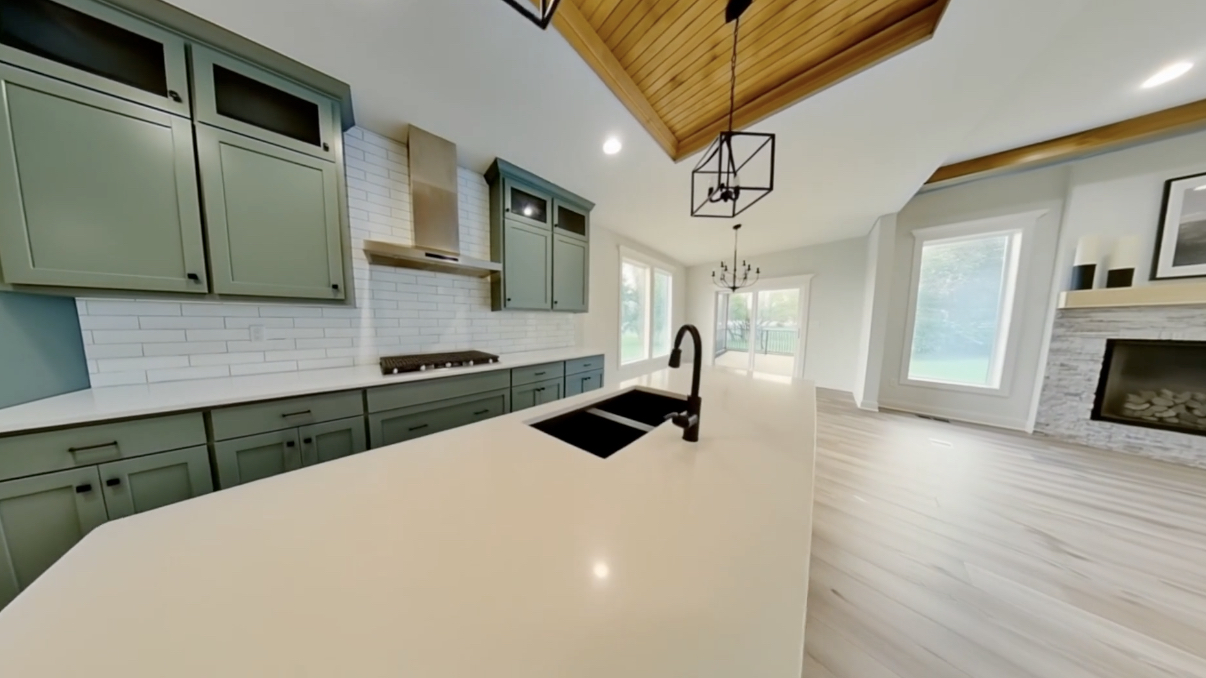
Listing reels at a glance
| Input | Listing photos as JPG, PNG, HEIC or WebP; nothing to film |
|---|---|
| Aspect ratios | 9:16 vertical, plus 16:9 horizontal and 1:1 square from the same project |
| Captions | Animated on-screen captions that carry the message with the sound off |
| Music | Commercially licensed track library, or export with no music |
| Voiceover | Optional AI narration you can leave off for a music-and-captions reel |
| Price from | $37.50/month on Creator billed annually, with a free plan to test first (see pricing) |
How do you turn listing photos into a reel?
Five steps from the folder of photos you already have to a vertical clip that is ready to post.
Pick the 6 to 10 strongest listing photos
Lead with the frame that would make you stop scrolling, usually the front elevation or the main living space. Drop near-duplicates; a reel has no room for two angles of the same bathroom.
Generate the video
Upload the set to PhotoAIVideo and generate. Each still gets camera motion such as a push-in, pan or parallax move, and the shots are sequenced into one clip.
Choose the vertical 9:16 format
Select the vertical export so the clip fills a phone screen edge to edge. Horizontal and square versions come out of the same project if you also want a YouTube or feed cut.
Add captions and music
Turn on animated captions so the address and headline features read with the sound off, pick a track from the licensed library, and add AI narration only when the home needs explaining.
Download and post
Download the finished file and upload it natively in each app, then write a caption that suits that audience instead of pasting the same text everywhere.
Which reel fits which listing moment
Each stage of a sale calls for a different cut from the same photo set. Length is given as a photo count, since that is what you actually choose.
| Listing stage | What the reel shows | Lead with | Suggested length |
|---|---|---|---|
| Coming soon | A teaser that holds back the full tour: the outside, one standout feature and the go-live date. | Front elevation or a striking detail | Shortest: 4 to 6 photos |
| Just listed | The complete highlight run, room by room, with price and address carried in captions. | Hero exterior, then kitchen and main living area | Fullest: 8 to 10 photos |
| Open house | The rooms visitors will walk through, plus the date, time and parking note on screen. | Entry, main living space, backyard | 6 to 8 photos |
| Price improvement | The new number up front, followed by the features that earn the home a second look. | Whichever photo drew the most attention at launch | 5 to 7 photos |
| Under contract | A brief status update that keeps your name in front of buyers still searching nearby. | Front elevation | 3 to 5 photos |
| Just sold | A thank-you to the seller that doubles as a proof point for the next one. | Exterior, then the room buyers talked about most | 4 to 6 photos |
Reframing horizontal listing photos for 9:16
Listing photos are shot landscape, so every vertical listing video starts as a crop.
What gets cropped
A landscape photo placed in a 9:16 frame keeps only a little over a third of its width, so whatever sits at the left and right edges falls outside the shot unless the motion travels to it.
Why wide rooms need a center subject
Wide-angle interiors spread interest across the whole frame, a window on one side and a fireplace on the other. In vertical the camera can only hold one at a time, so favor room shots where the feature lands near the middle.
Why the opening seconds matter most
People decide almost immediately whether to keep watching, so the first one or two seconds should be the best exterior or the hero room, never a hallway or closet.
What a listing reel is, and what it is not
A listing reel belongs to one property and one moment in its sale, cut from the listing shoot rather than filmed like a brand or market-update clip. Plan on several per home rather than one polished film.
Comparing tools rather than planning posts? The AI real estate reels maker page covers the software side, and our blog walks through creating a reel step by step in any editor.
Real estate reels FAQ
Make the reel for your next listing tonight
Upload the photos from your latest shoot, pick the vertical export and post it before the open house.